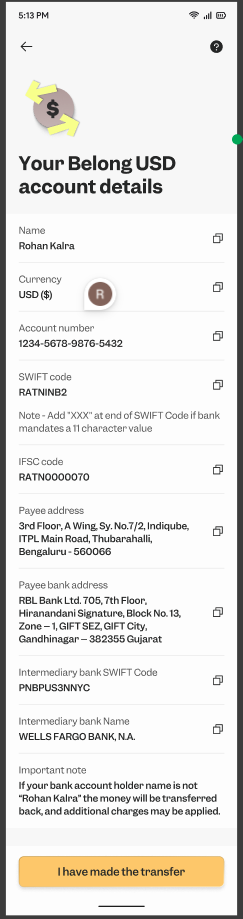
How do I find SWIFT details of the Belong wallet?
On the home screen of the app, please navigate to the top right corner and click on the green box as shown below:
Once you have landed to the next page; follow these steps:

"+ Add" -> SWIFT transfer -> View your Belong Account details
Your Belong wallet details should be shown like:
Related Articles
How to transfer money from Wise multi currency account to Belong wallet?
The process to transfer from Wise to Belong wallet is a very simple one. Just follow the steps below: 1. Add a new currency: Click on the "+" option to add the new currency. 2. Convert to USD: 3. Check the conversion rate & fees: 4. Confirm the ...How can I transfer funds from XE to my Belong wallet?
You can make a fund transfer from XE fund transfer services to your Belong wallet in USD. Here are the steps for making the fund transfer. 1. Open an account with XE The steps for opening an account with XE are written in this article. 2. Enter your ...As a resident Indian, how do I transfer funds from my Indian account to Belong wallet?
As a resident Indian, you can transfer funds from your Indian savings account to Belong wallet in USD to invest. Follow the steps mentioned below to make the fund transfer to Belong wallet. 1. Select the international transfer option in your Indian ...What is the Belong wallet? Why do I need it?
Each Belong customer will have a Belong wallet. You will be able to transfer money from your UAE bank account to it and invest in GIFT City products via the wallet. It’s similar to a Zerodha or Groww wallet which you may be using for investments in ...How do I transfer funds from my overseas account to my Belong wallet?
Once your Belong wallet is active after the completion of KYC, you will be able to see your wallet details in the Belong app itself. If you are a UAE customer, you can simply link your local bank account and make the transfer. Refer to this article: ...